Every month
Request a video for something special
Ask us for a video about a promotion, a new service or an event, and see what it counts toward.
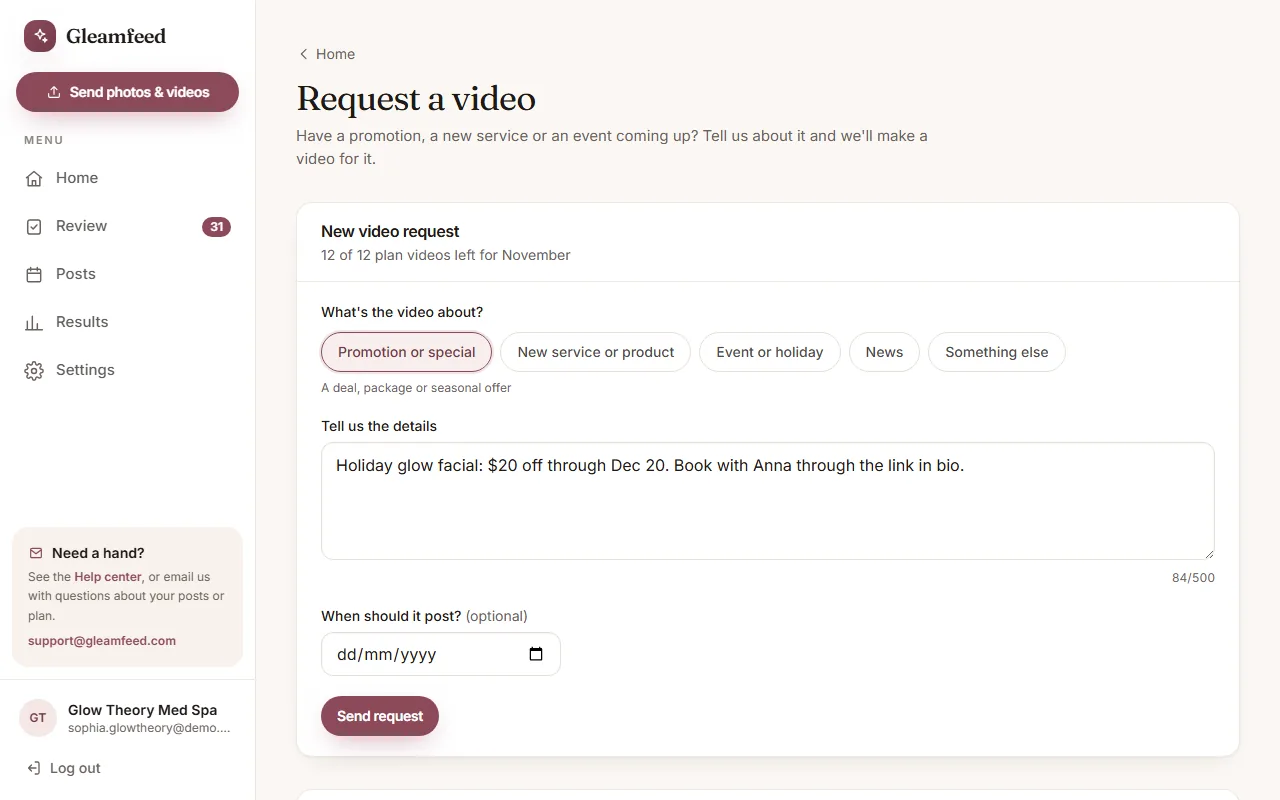
Have a promotion, a new service or an event coming up? Ask us for a video about it any time from your account.
How to ask
- On Home, click Request a video.
- Choose what it's about: Promotion or special, New service or product, Event or holiday, News, or Something else.
- Tell us the details, up to 500 characters: dates, prices, what's included, who to book with. If you like, choose when it should post.
- Click Send request. Then add photos or clips for this video if you have them. If you don't, we use the photos you've sent before.
Your request shows under Your requests: Received, then In progress, then Ready to review. When it's ready, click Review it and approve it like any other post. You can Cancel a request until we start working on it. In Review, every video also has a Download video link.
What it counts toward
- Free trial videos. If we've given you free trial videos, your requests use those first. Trial videos have a small gleamfeed.com mark in the corner. You can watch and download them, and we start posting once you choose a plan.
- Your plan. A request uses one of your plan's videos for the month, if any are left. We make most of your month's videos early in the month, so once they're made, a new request is an extra video.
- Extra videos. On a plan, you can buy extra videos on the Request a video page with PayPal: a one-time payment, 1 to 5 at a time, at the price shown there. Extra videos don't expire.
Wording we can't use
Posts can't promise results or make medical claims, for example “guaranteed” or “pain-free”. If your details include words like these, we let you know and word the post in a way that's allowed.
Still have a question?
Email us and a real person will help.