Every month
Video cover images (thumbnails)
What your video covers are, where they show up, and how to get a different one.
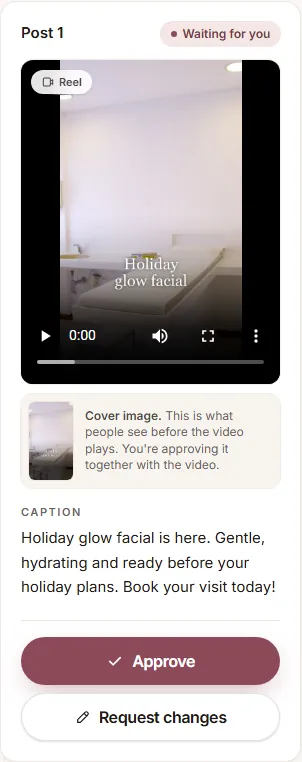
A cover image, or thumbnail, is the still picture people see before your video plays: in your Instagram grid, on your TikTok profile, in YouTube Shorts and in feeds. A clear cover helps people stop and tap.
How we make your covers
- Every video gets a cover made from its opening shot: one of your photos with the video's title.
- It's sized for vertical video (1080 × 1920), with the title placed so it stays visible when Instagram crops your profile grid.
You approve it with the video
Under Review, each video shows its Cover image below the player. When you click Approve, you approve the video, its caption and its cover together, and we post exactly that cover. Instagram doesn't let anyone change a Reel's cover after it's posted, so take a quick look before you approve.
Want a different cover?
- Click Request changes and tell us what you'd like: another photo, a different title, or shorter text. We send the updated video back for you to approve.
- Have your own design, for example from Canva? Email it to support@gleamfeed.com: a JPG, vertical 9:16 (1080 × 1920 is best), up to 2 MB. We use JPG because Instagram only accepts JPG covers.
Where your cover shows up
Instagram Reels, TikTok, YouTube Shorts, Facebook, Pinterest and LinkedIn use the cover you approved. Threads and Google don't support custom covers, so they show the first frame of the video, which also carries the title.
YouTube needs a verified channel
YouTube only allows custom thumbnails on channels verified with a phone number. If your channel isn't verified yet, verify it in YouTube Studio under Settings → Channel → Feature eligibility.
Still have a question?
Email us and a real person will help.